
How to get into AI for Non-Technical Late Bloomers: A Beginner’s Guide
Michael Spencer and Daria Cupareanu from AI Supremacy
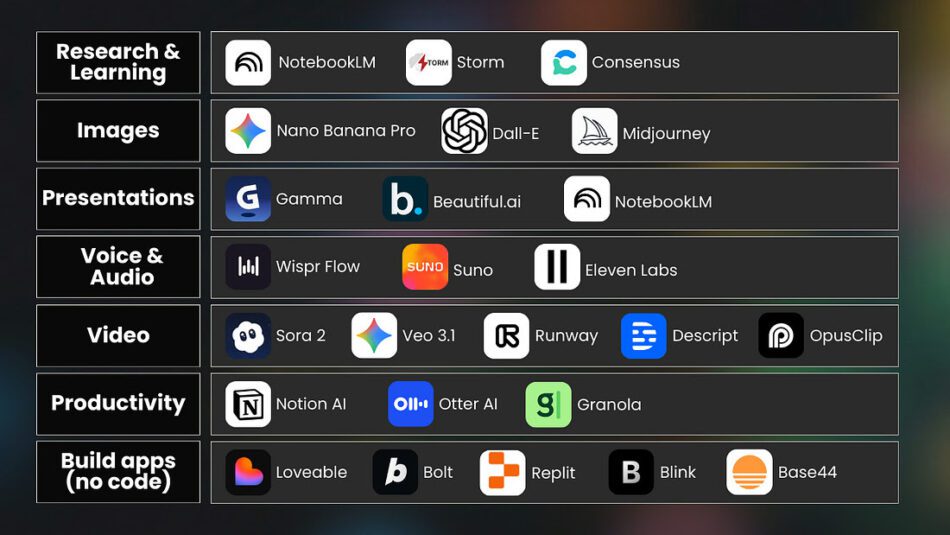
As one of the older AI Newsletters on Substack, I pride myself on getting a variety of voices and perspectives on here with the help of guest contributors. From learning about how to use AI, to multiple other topics, our niche has been fairly broad over the past four years. I wanted to build something useful and try to add value for casual readers and also for more serious AI enthusiasts.
Share AI Supremacy
asked Daria Cupareanu of AI Blew My Mind Newsletter about how to take up AI if you are just starting out. A lot of my valuable readers it turns out are actually a lot of people with more discretionary time, like those who are over 50 and including those who may have (already) had a great career who want to keep a pulse with what’s going on in AI and BigTech. But also to empower themselves with this new technology and embrace it in use cases where and if – it works for them. But how to start?
The applied nature of Daria’s work (who is one of my most viral guest contributors – go Romania ) should also be commended. Sometimes you just want to read something in plain english that’s easy to integrate into your life. Introducing:
AI Blew my mind LAB
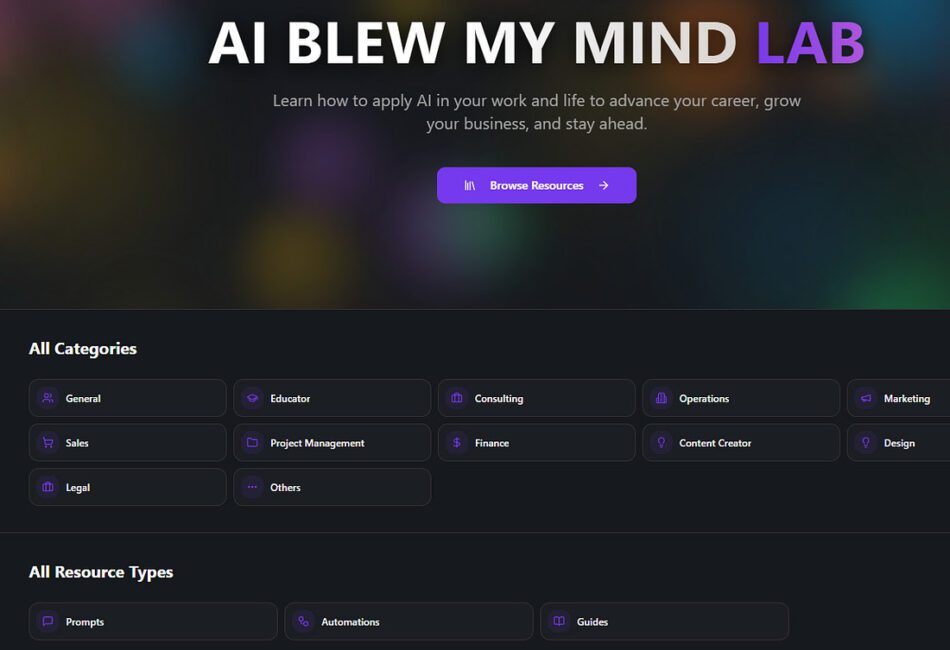
AI Blew my Mind LAB. Go here.
resenting Daria Cupereanu’s AI Learning LAB
AI blew my mind LAB – A practical resource library with prompts, tools, automations, and step-by-step guides for using AI in your work and life. Built for any level and any role, so you can learn on your own terms.
To read Daria’s last article with us go here. It was called: How to use AI to Optimize your Personal Life and Free Time.

If you find this article useful to you, kindly share it with someone who might benefit from it as well.
Share
So in plain english, for those who want to start from the very beginning.
How to get into AI for Non-Technical Late Bloomers: A Beginner’s Guide
A starting point for anyone who wants AI to feel less confusing and more like something they can use in real life.

…
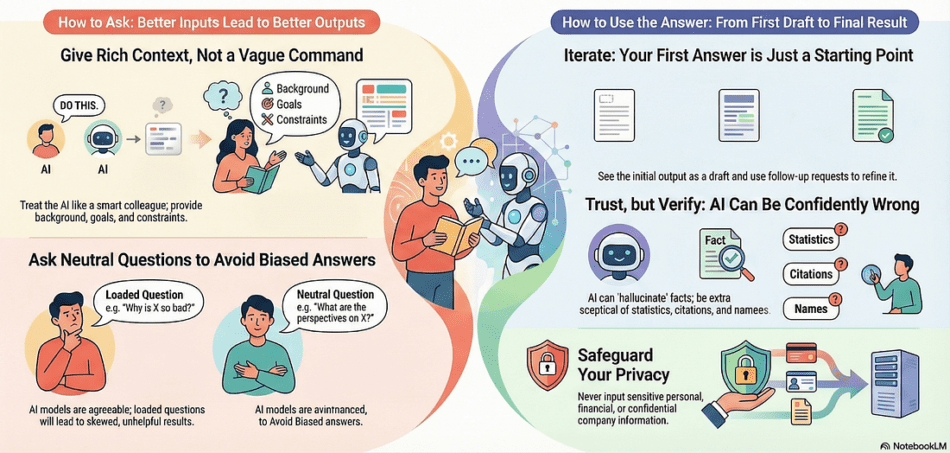
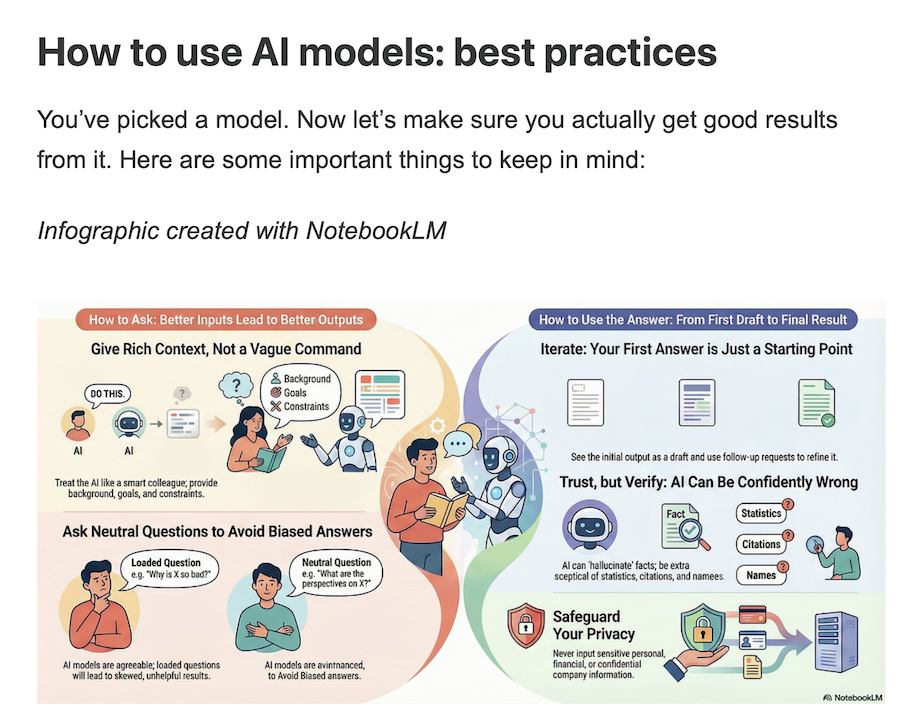
| 1. Give context like you’re delegating to a smart colleagueAI has no idea what your situation is or what you actually want unless you tell it.What most people do: “Give me a recipe”What actually works: “I have chicken breast, broccoli, rice, and basic spices. I need a healthy dinner for 2 that takes under 30 minutes. We don’t like spicy food. Give me step-by-step instructions on how to prepare it.”Same with emails, presentations, advice – anything. The more context you give, the more relevant the output.And by the way, this is what people mean when they say “prompting“. It’s just the fancy word for every message you type into an AI.What matters most (especially as models evolve and get better) is thinking clearly and communicating what you actually need.Context is a big part of it. The other part is some prompting best practicesthat can help you get better results. 2. Ask neutral questions (AI is a people-pleaser)AI models are built to be helpful and very agreeable, almost like a mirror.If you want real help with creating something or making a decision, you need to phrase things in a more neutral and tactical way so your own biases don’t steer the answer.Confirmation-seeking: “Isn’t it better to buy this laptop than this one?” Better question: “What are the pros and cons of these two laptops and in which situations would each one be a better fit?”If you want to go deeper into avoiding biased questions and asking AI better ones, I wrote more about it here. 3. Iterate, the first answer is just a starting pointUsing AI is not a one-and-done thing. You don’t just throw in a request and get the best output on the first try. Sometimes you’ll get lucky, but not often enough to rely on it.That’s where a lot of people get frustrated instead of seeing the first answer as a rough draft. People who work well with AI treat it the way you’d treat any draft: you review it, adjust what doesn’t fit, ask for changes, and shape it step by step until it works. A real session looks like this:You: “Help me write an email to my team about our new hybrid policy. Under 200 words, professional but warm.” AI: [First draft]You: “Add a specific example of how this helps work-life balance. Then make the opening more personal based on this context: [context] ”This back-and-forth is how you get useful results. |
…


Source: BOND
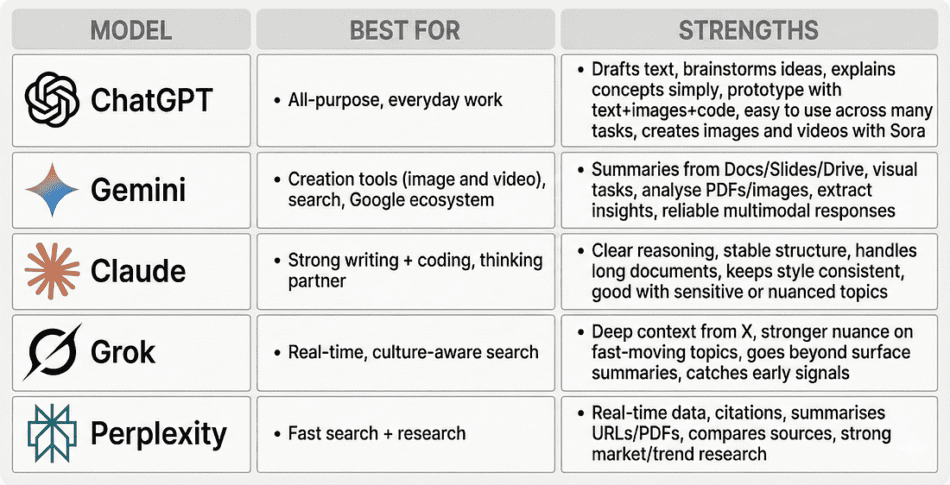
The most well-known AI models and which one to start with
When you’re new to AI, the first instinct is usually to overthink which model to pick. That part doesn’t matter as much as people think. It’s better to choose one solid general-purpose model and go all in. Gemini, Claude, or ChatGPT all work fine for that.
Here’s a brief overview of the most well-known ones:

Daria on Instagram. Building with AI.
How people actually use AI models
To get a sense of how you can use AI in your own life, seeing how others already use it can give you some great inspiration.
Recent research from the National Bureau of Economic Research looked at more than one million ChatGPT conversations and found that about 70% of chats were personal and only 30% were work-related.
When you zoom in, most conversations fall into three big buckets: Asking, Doing, and Expressing.
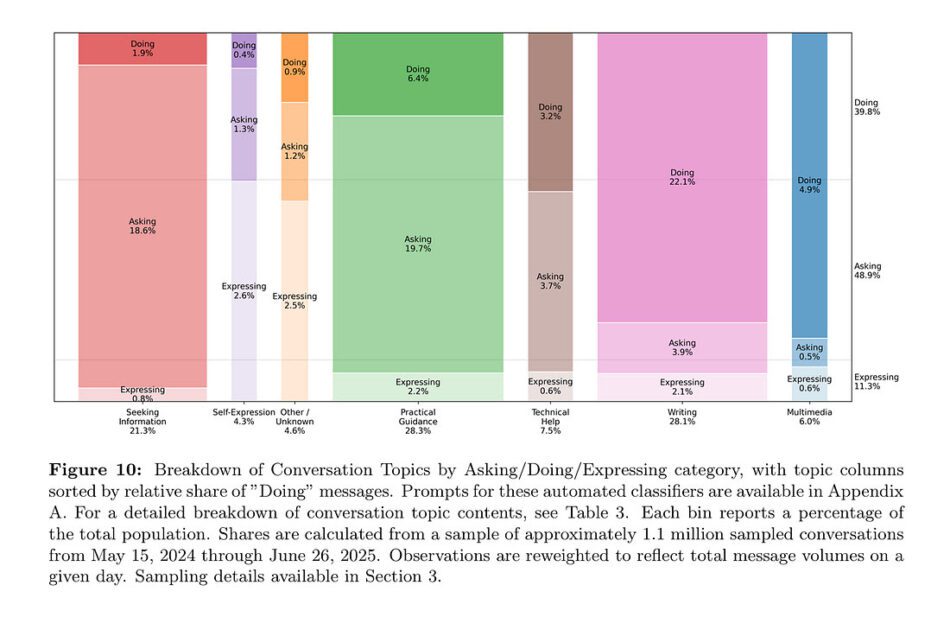
Asking
People usually come in to make sense of something, ask for guidance, or see their options more clearly. And unlike Google, where you still need to sift through links and piece together your own answer, AI tailors the response directly to what you asked.
- “How does intermittent fasting work?”
- “How do I fix a leaky faucet?”
- “What’s a good birthday gift for a 7-year-old who loves dinosaurs?”
Doing
This is the moment when someone says “do it for me” or “help me do it”. You see it most in writing, planning, technical tasks, and anything creative like images or videos.
- “Rewrite this email.”
- “This is everything I have in the fridge, give me three meals I can cook and the recipes.”
- “Summarize this book into three main takeaways.”
Expressing
A smaller group uses AI the way you’d use a notebook, a therapist, or a friend. They talk things out, process emotions, or try to untangle what’s going on in their head.
- “I feel stuck in my career and don’t know what direction to take.”
- “I’m overwhelmed with everything on my plate and need to talk this through.”
- “I’m anxious about an upcoming move to a new city, how should I prepare?”
The pattern? AI meets people where they are. Sometimes you need information. Sometimes you need a task done. Sometimes you just need to think out loud.

Where AI fits in your life
Once you see how others use AI, the next question becomes: where does it fit for you?
When something is new, you don’t automatically see where it fits or what you can use it for. Examples help because they spark ideas, but the real learning comes from trying it on almost anything at the beginning.
With time, you’ll develop a sense for when it helps and when it doesn’t, but that only happens through use.
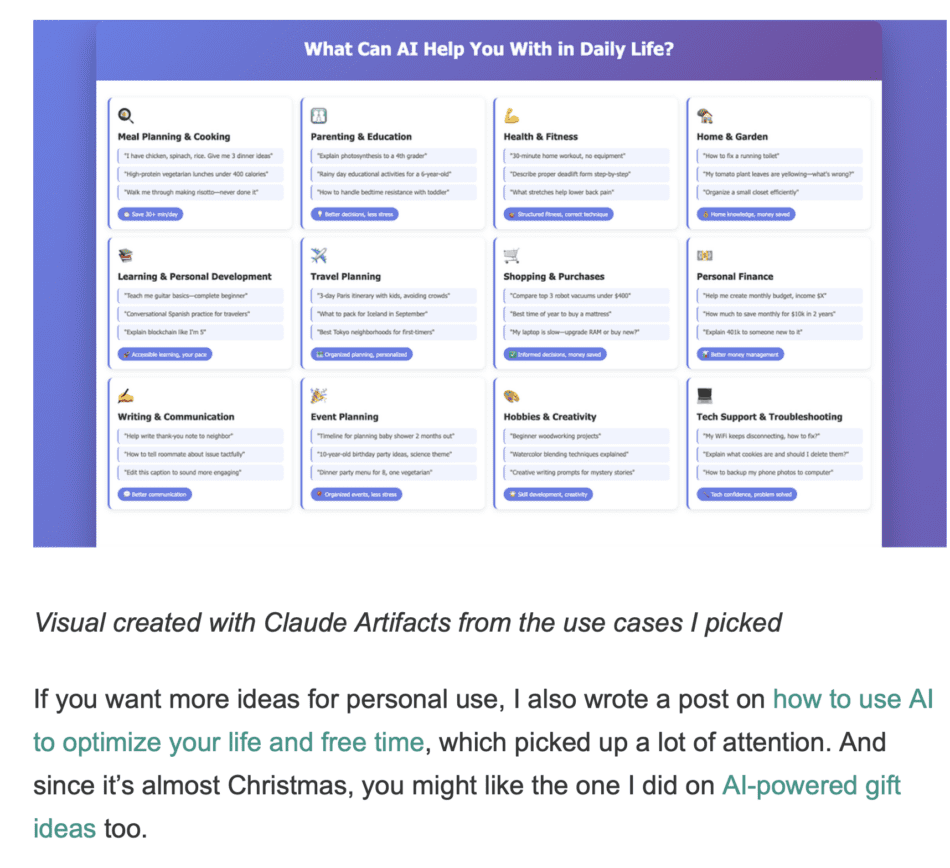
Here’s a mix of everyday and work examples to get you started:
| 1. Give context like you’re delegating to a smart colleagueAI has no idea what your situation is or what you actually want unless you tell it.What most people do: “Give me a recipe”What actually works: “I have chicken breast, broccoli, rice, and basic spices. I need a healthy dinner for 2 that takes under 30 minutes. We don’t like spicy food. Give me step-by-step instructions on how to prepare it.”Same with emails, presentations, advice – anything. The more context you give, the more relevant the output.And by the way, this is what people mean when they say “prompting“. It’s just the fancy word for every message you type into an AI.What matters most (especially as models evolve and get better) is thinking clearly and communicating what you actually need.Context is a big part of it. The other part is some prompting best practicesthat can help you get better results. 2. Ask neutral questions (AI is a people-pleaser)AI models are built to be helpful and very agreeable, almost like a mirror.If you want real help with creating something or making a decision, you need to phrase things in a more neutral and tactical way so your own biases don’t steer the answer.Confirmation-seeking: “Isn’t it better to buy this laptop than this one?” Better question: “What are the pros and cons of these two laptops and in which situations would each one be a better fit?”If you want to go deeper into avoiding biased questions and asking AI better ones, I wrote more about it here. 3. Iterate, the first answer is just a starting pointUsing AI is not a one-and-done thing. You don’t just throw in a request and get the best output on the first try. Sometimes you’ll get lucky, but not often enough to rely on it.That’s where a lot of people get frustrated instead of seeing the first answer as a rough draft. People who work well with AI treat it the way you’d treat any draft: you review it, adjust what doesn’t fit, ask for changes, and shape it step by step until it works. A real session looks like this:You: “Help me write an email to my team about our new hybrid policy. Under 200 words, professional but warm.”AI: [First draft]You: “Add a specific example of how this helps work-life balance. Then make the opening more personal based on this context: [context]”This back-and-forth is how you get useful results. |
…